
Kondory Technology - Equipment maintenance software
Skip to main content
Kondory: AI virtual assistant Online
0:00 Recording voice note…
Developed by Kondory Tecnología
¡Hola soy tu asistente virtual con I.A. !

Maintenance Management Software for Preventive & Corrective Maintenance

Biomantenimiento is Kondory's SaaS maintenance management software (CMMS): control preventive and corrective maintenance of biomedical, industrial, IT and air conditioning equipment from the cloud.

In short

What is Biomantenimiento?

Biomantenimiento is cloud maintenance management software (a CMMS) built by Kondory Technology as a SaaS product. It lets teams record and control preventive and corrective maintenance of biomedical, industrial, IT and air conditioning equipment, keep equipment records with QR codes and export PDF and Excel reports, with no limit on users or equipment.

See how it works
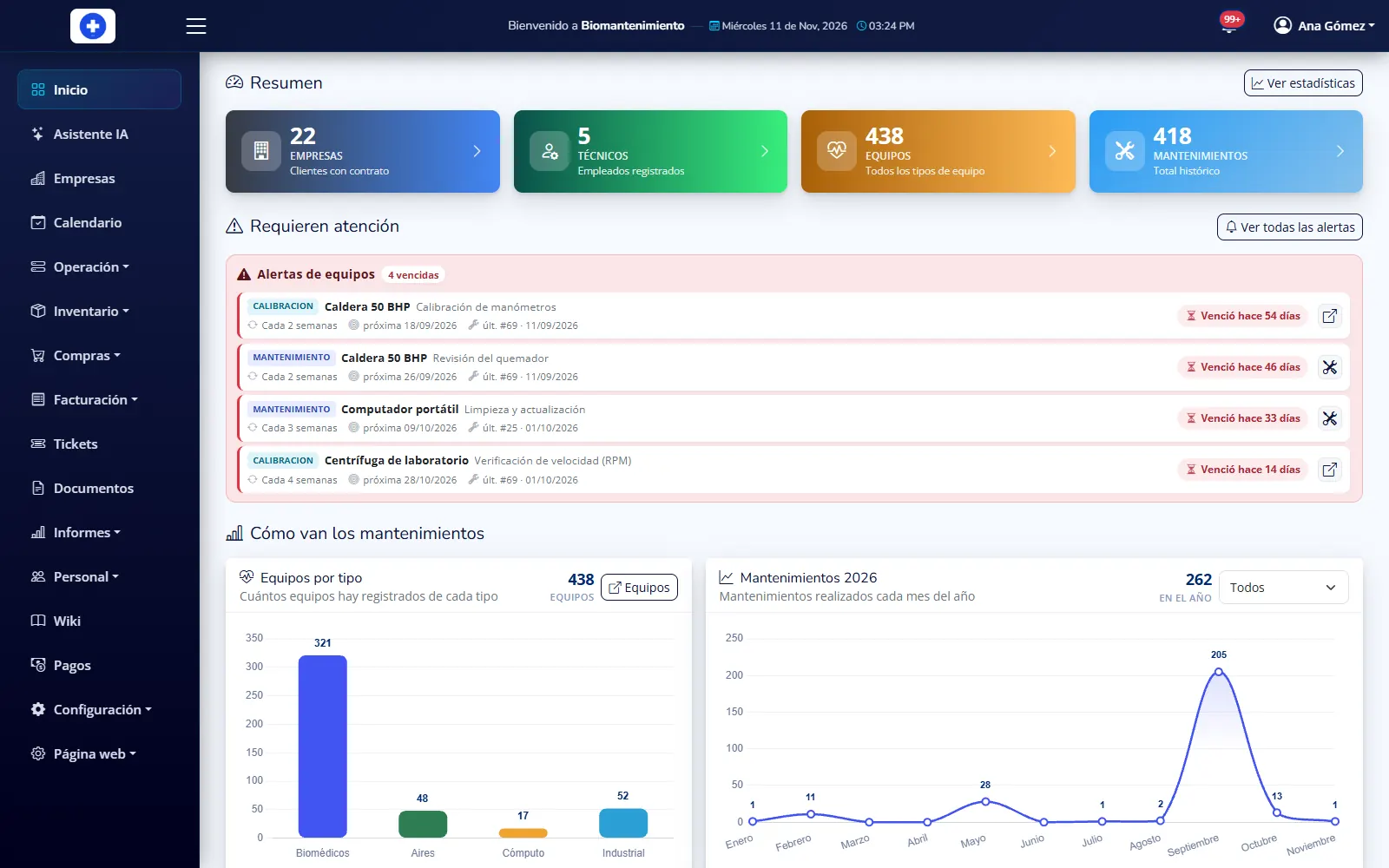
Biomantenimiento home dashboard with indicators, overdue asset alerts and maintenance charts
Real screenshot of the system, with sample data.

Solution sheet

Who it’s for
Maintenance companies, clinics and hospitals, industrial plants and IT teams.
Assets managed
Medical, industrial and IT equipment and air conditioners, each with its record and QR code.
Main modules
Inventory and asset records, schedule and alerts, maintenance, PDF reports, spare parts and purchasing, invoicing and client portal.
Where it runs
In the cloud, from the browser on a computer, tablet or phone; technicians record on site.
User profiles
Administrator, technician, client and warehouse, each with what they need.
Implementation and support
Equipment loaded from Excel, fields and checklists configured, training and support included.
Warning signs

When maintenance software pays off

  1. 01

    Equipment records live in folders and turn up half-complete when an audit arrives.

  2. 02

    The preventive schedule lives in a spreadsheet only one person understands.

  3. 03

    The client asks for the monthly report and someone has to build it by hand.

  4. 04

    The technician gets to the equipment without knowing what was done last time.

How it works

What Biomantenimiento looks like inside

The full maintenance journey, step by step: from registering the asset to the signed report and the AI query.

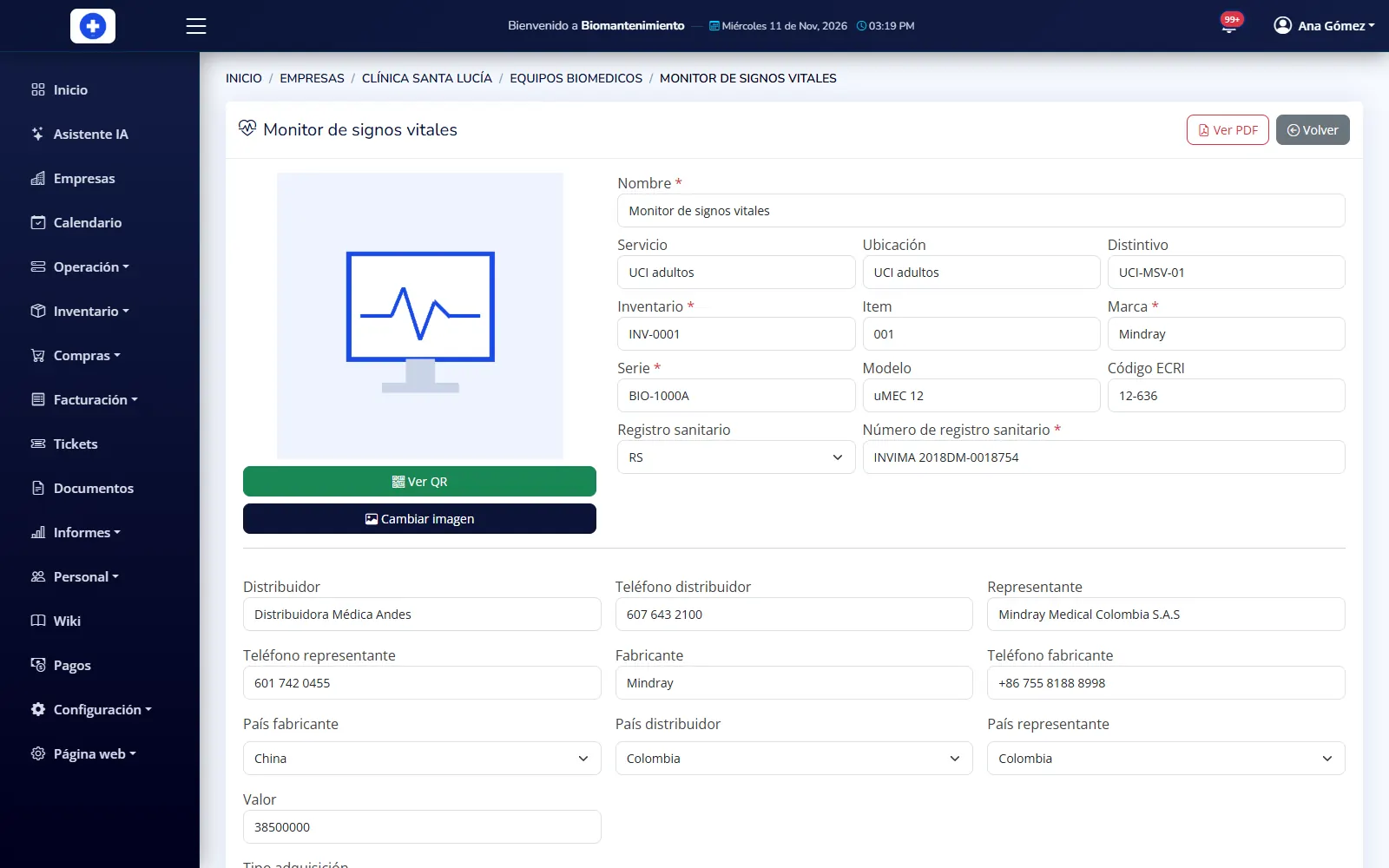
Equipment record of a vital signs monitor in Biomantenimiento, with its technical sheet and the View QR button
Step 1 of 6 · Equipment and records

Your whole equipment inventory, with up-to-date records

Each asset is registered with its site, area, technical sheet, sanitary registration and history in a single inventory, with its own QR code.

  • Organized like your companyEquipment by company, site, area and type; the schedule and reports are filtered with that same structure.
  • Bulk upload from ExcelUpload hundreds of assets at once instead of creating them one by one.
  • Attachments, accessories and transfersAttach manuals and certificates, record accessories and keep the history when an asset moves to another site.

With the asset registered and its QR code attached, protocols can be assigned and visits scheduled.
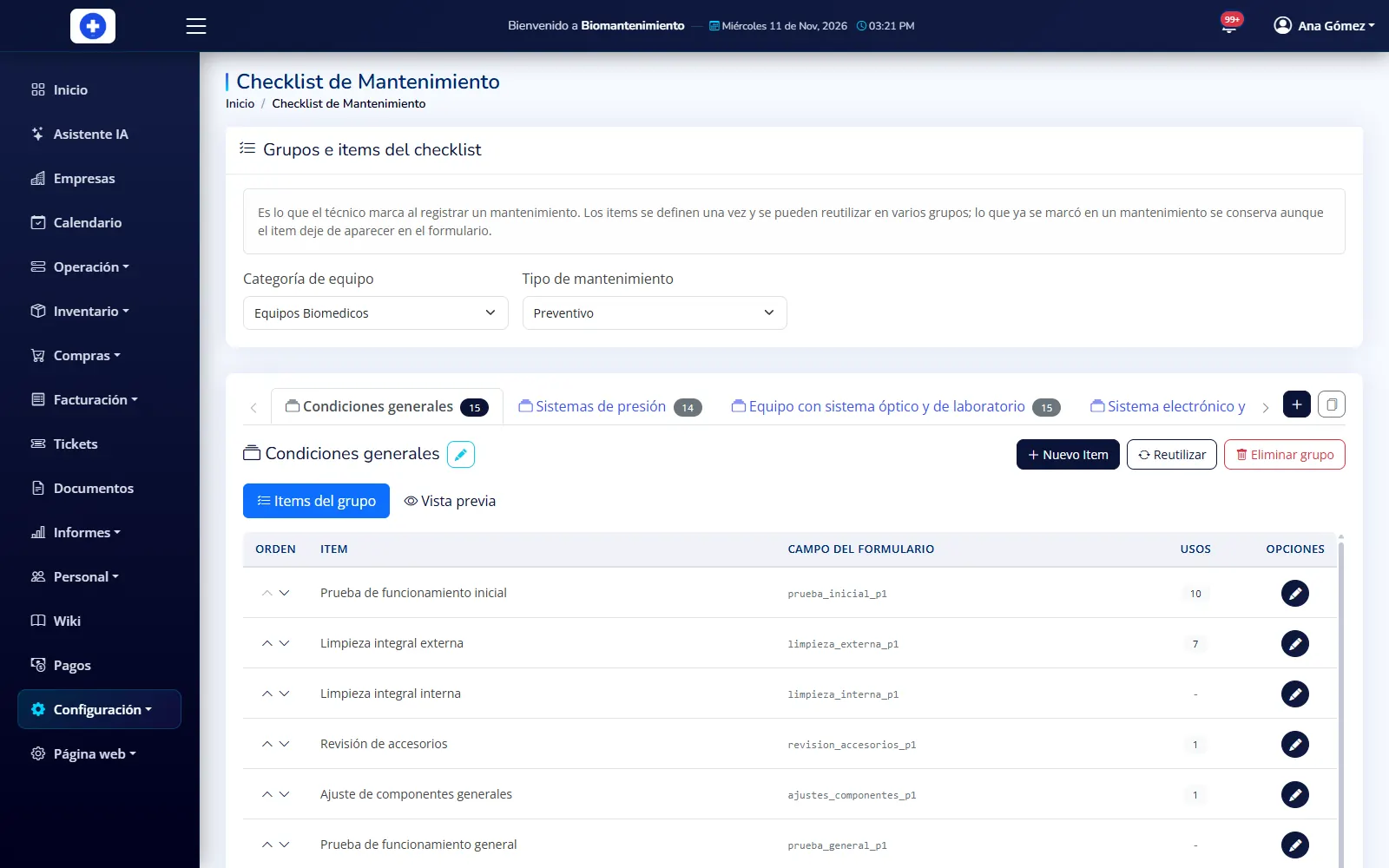
Maintenance checklist setup in Biomantenimiento, with groups and items
Step 2 of 6 · Checklists

Your protocols, on every visit

Set up the inspection routine for each type of asset and maintenance. The technician finds it ready in the form and checks it on site.

  • By category and maintenance typeOne list for preventive maintenance of medical equipment, another for air conditioners, and so on.
  • Reusable itemsAn item is defined once and used in several groups; what was checked is kept even if the item changes later.
  • The fields your operation needsDecide which data is requested for each asset, maintenance and spare part, using your company’s own terms.

The checklist is ready in the technician’s form for every maintenance that gets scheduled.

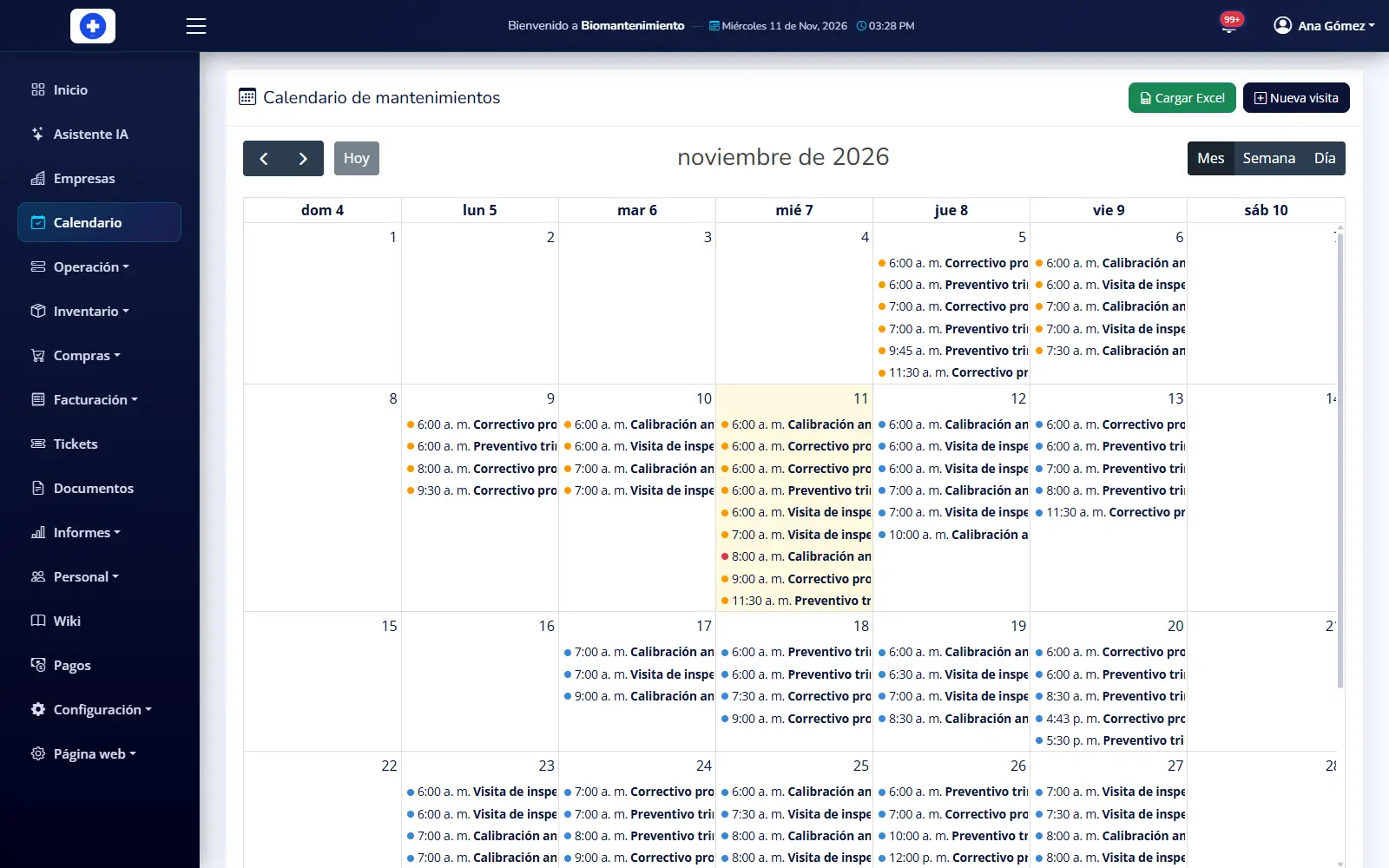
Biomantenimiento maintenance calendar with preventive, corrective and calibration tasks scheduled for the month
Step 3 of 6 · Schedule and alerts

No due date slips through

Plan the year’s maintenance by site and area, and get alerts about upcoming dates and anything overdue.

  • Month, week and day calendarSee what is pending this month at a glance and load the schedule from Excel.
  • Alerts by date and by usageIt warns you when a scheduled date is near or an asset reaches its operating-hours limit.
  • Visits signed by the clientThe client signs one visit or several at once, and the signature stays as proof of service.

Each scheduled visit shows up for the technician, who performs it and records it from the phone.

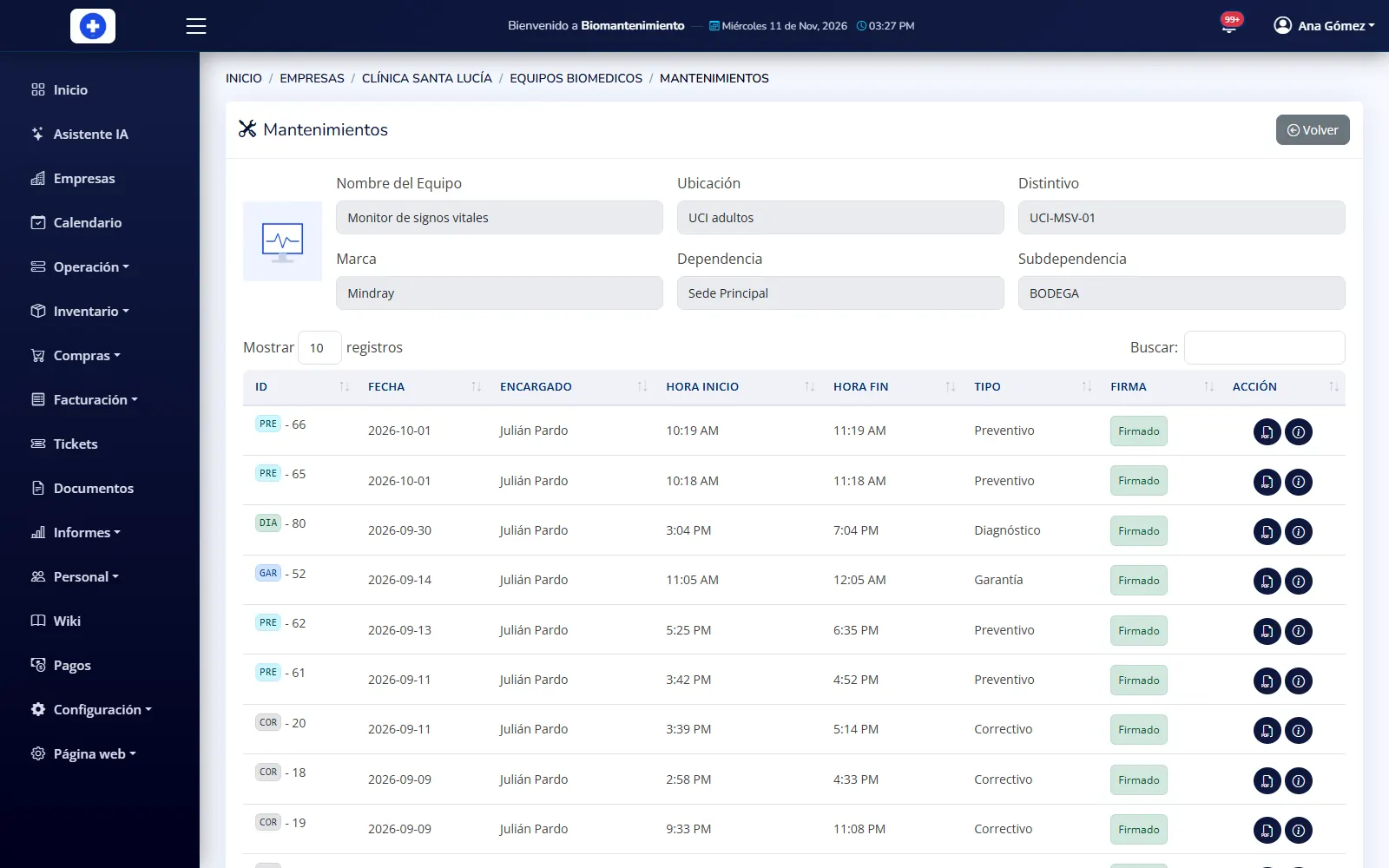
Maintenance history of an asset in Biomantenimiento: preventive, diagnosis, warranty and decommissioning, with signature status
Step 4 of 6 · Maintenance

Six types of maintenance in one system

Preventive, corrective, diagnosis, warranty, installation and decommissioning. Each one asks for the information that must really be recorded and is signed in the asset history.

  • The form adapts to the assetPressures and amperage for an air conditioner, hours of use for an industrial machine: each asset shows its own fields.
  • Spare parts, photos and on-site signatureThe technician deducts spare parts from inventory, attaches photos and gets the client signature on the phone.
  • Measurements with reference equipmentEach measurement is saved with the instrument used, the deviation and the calibration certificate.

Once signed, the PDF report is available to the client and the dashboard indicators are updated.

Biomantenimiento home dashboard with indicators, overdue asset alerts and maintenance charts
Step 5 of 6 · Dashboard and reports

Your operation at a glance when you log in

The dashboard brings together companies, technicians, assets and maintenance, overdue asset alerts and the year’s trend. When a maintenance is closed, its PDF report is ready.

  • Indicators and chartsMaintenance done per month, assets by type and compliance rate.
  • One or many PDF reportsDownload the report of one visit or bundle all the reports of a site in one step.
  • A report format for each clientSet up a report format per client without changing the others.

Whatever the dashboard shows can also be asked to the assistant in plain language.

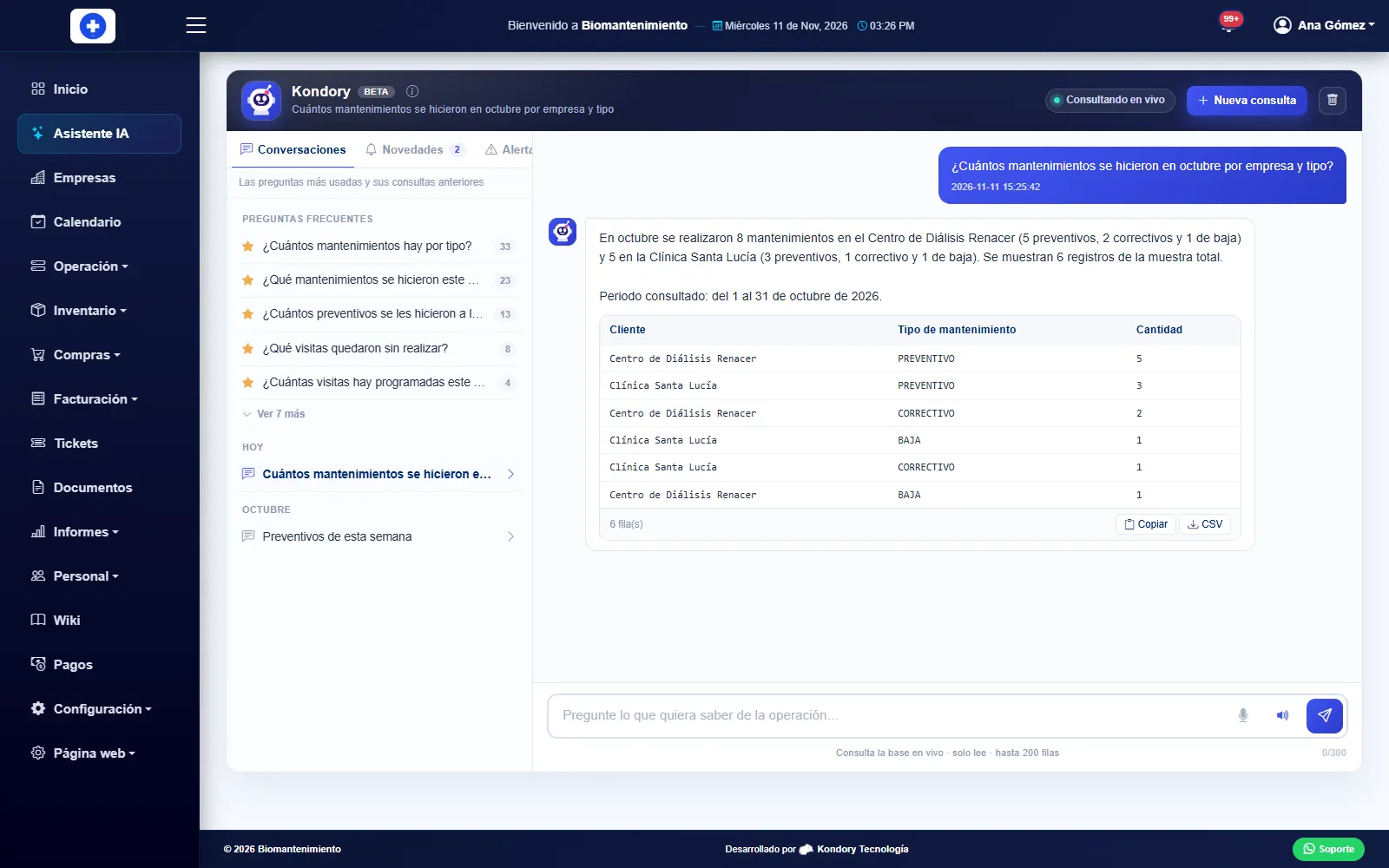
Biomantenimiento AI assistant answering how many maintenance tasks were done in October by company and type, with a results table
Step 6 of 6 · AI assistant

Ask about your operation and get the answer with its table

The assistant answers in plain language about your assets, maintenance and visits, using the system data and a backup table ready to copy or download.

  • Ask the way you talk"Which preventive tasks are due this week?" or "which assets have an expired calibration?".
  • Only what you are allowed to seeEvery answer is filtered with the permissions of the user who asks.
  • Also by voiceDictate the question on the phone and listen to the answer, without putting the tools down.

It closes the loop: information from the whole operation, ready for decisions and the next audit.

Real screenshots of the platform (in Spanish) with sample data. See all features

Who uses it

What each profile sees in Biomantenimiento

Each person logs in with their own profile and sees only what they need.

  • Administrator

    Manages the whole platform and has access to every module. Oversees technicians, equipment, reports and settings.

    Can

    • Create clients, technicians and users
    • Register equipment and its maintenance
    • Assign maintenance jobs to each technician
    • Configure the platform and see every report

    Cannot: Nothing: full access to every module.

  • Technician

    Manages maintenance, records diagnoses, updates equipment and uploads documents.

    Can

    • Scan the QR and open the equipment record
    • Log diagnoses and activities
    • Update equipment data and photo
    • Upload documents and evidence

    Cannot: Create users or change settings.

  • Client

    Read-only. Sees their equipment, maintenance history and reports.

    Can

    • View their equipment and its records
    • See maintenance history
    • Download their reports as PDF and Excel
    • Review compliance statistics

    Cannot: Change data: the profile is read-only.

What the service includes

What you get with Biomantenimiento

It is not just software access: we support you from loading your equipment until your team works with the platform on its own.

  • Cloud platform

    Nothing to install: log in from the browser on a computer, tablet or phone, and improvements arrive without installations.

  • Loading your equipment

    Your inventory comes in from Excel, organized by company, site and area, with our team supporting the implementation.

  • Set up for your operation

    Fields, checklists and report formats adjusted to the way you work and to each client.

  • Training

    Included in every plan, for administrators, technicians and clients, with the built-in manual as support.

  • Technical support

    Included in every plan: a team that knows the platform solves your questions and requests.

  • Unlimited e-signatures

    Unlimited clients and maintenance records, with the client signature on every report and visit.

Plans are chosen by the number of assets you manage.

Common questions

Frequently asked questions

What is maintenance management software (CMMS)?
It is a tool that centralizes the equipment inventory, its documentation and the log of preventive and corrective maintenance so every asset is tracked in an orderly way. Biomantenimiento is Kondory's maintenance management software, delivered as a cloud service.
What types of equipment can I manage?
Biomedical, industrial and IT equipment and air conditioning systems. Each asset is registered in the inventory with a QR code and has its own equipment record, plus decommissioning records.
Does it cover both preventive and corrective maintenance?
Yes. You manage both types of maintenance, technicians record diagnoses and documentation, and the history stays linked to each asset. You can generate maintenance reports and compliance statistics in PDF and Excel.
Which user roles are available?
Three: administrator, with access to every module; technician, who manages maintenance and equipment; and client, a read-only role for their equipment, history and reports. See it in action in the free demo.
Do I need to install anything, and is there a user limit?
Nothing to install: use it from any browser on a computer, tablet or smartphone. The platform does not limit the number of users or equipment.
Can you build maintenance software tailored to my company?
Yes. Besides Biomantenimiento as a product, Kondory offers custom software development and SaaS platform development for specific maintenance processes.
Get to know the system

Book a demonstration

Choose a time that works for you. We will review your operation and answer your questions about the system.

Choose a date and time Open the calendar in a new tab